
Mobile Speed Optimization Service — 90+ PageSpeed Score Guaranteed or You Don’t Pay
My services ensure your site loads lightning-fast on smartphones and tablets.
Improve Core Web Vitals, User Experience, and Conversions.
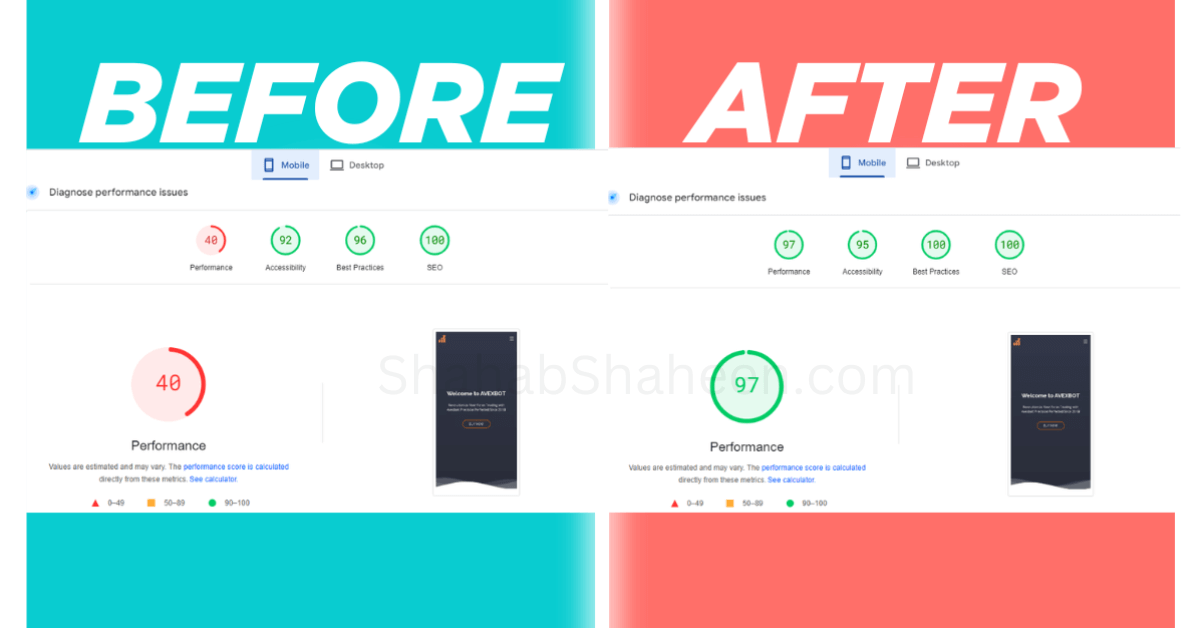
Mobile PageSpeed Insights — before & after
Google data shows that improving mobile load time from 3 seconds to 1 second can increase conversions by up to 27%. My Mobile speed optimization services are designed to ensure your website loads quickly on mobile devices and tablets, passing core web vitals and providing a better user experience and improved conversions.
Why Mobile Speed Matters
- Mobile-First Indexing: Google ranks sites based on their mobile performance.
- Better User Experience: 53% of users leave if a mobile site takes more than 3 seconds to load.
- Higher Conversions: Faster mobile sites drive sales and reduce cart abandonment.
- Competitive Advantage: Outperform competitors with a smooth, responsive mobile experience.
What Causes Poor Mobile Speed?
Mobile speed problems are rarely caused by just one thing. Most websites suffer from a combination of issues that stack on top of each other, and fixing only one of them won’t get you to a 90+ PageSpeed score. Here are the most common root causes I find when auditing WordPress sites for mobile performance:
Unoptimized Images
Images are the single biggest contributor to slow mobile load times. Large images uploaded at desktop resolution get served to mobile users at full size, forcing a slow connection to download far more data than needed. Images not converted to modern formats like WebP or AVIF make this even worse. Every oversized, uncompressed image adds seconds to your mobile load time.
Render-Blocking JavaScript and CSS
When a browser loads your page on mobile, any JavaScript or CSS file that isn’t deferred or minified blocks the entire page from rendering until it’s fully downloaded. Mobile processors are significantly slower than desktop processors, meaning render-blocking resources hit mobile performance much harder. A single heavy plugin or theme script can add 2–3 seconds to your mobile load time alone.
Slow Server Response Time (High TTFB)
Time to First Byte (TTFB) measures how long your server takes to respond to a browser request. On mobile, where connections are slower and less stable than desktop broadband, a high TTFB compounds the problem. Poor hosting, no server-side caching, and no CDN are the most common causes. Even a well-optimized page will feel slow if the server itself is sluggish.
No Mobile-Specific Caching Configuration
Many WordPress sites have caching enabled but not properly configured for mobile devices. Desktop and mobile versions of a site often need separate cache rules. Without mobile-specific caching, every mobile visitor may be hitting the server fresh instead of loading a cached version, dramatically increasing load times.
Bloated WordPress Themes and Page Builders
Popular page builders like Elementor, Divi, and WPBakery load large CSS and JavaScript libraries on every page, regardless of what features are actually used. On desktop, this is inconvenient; on mobile, it’s devastating. A theme that scores 85 on desktop can score 35 on mobile purely because of how these libraries load on lower-powered devices.
Third-Party Scripts
Every third-party tool you add to your site, such as Google Analytics, Facebook Pixel, live chat widgets, heatmap tools, cookie consent banners, adds an external HTTP request that your mobile visitor’s connection has to resolve. These scripts are loaded from external servers you don’t control, and on a slow mobile connection, they can each add hundreds of milliseconds to your load time.
Missing Lazy Loading
Without lazy loading, every image on your page, including ones the visitor may never scroll to, loads immediately when the page opens. On mobile, where bandwidth is limited, loading 20 images at once when only 2 are visible above the fold wastes precious resources and slows down the initial load dramatically.
Poor Font Loading Strategy
Web fonts loaded without proper font-display settings cause mobile browsers to wait for font files to download before rendering any text. This leads to invisible text or layout shifts during loading, both of which hurt your Core Web Vitals scores on mobile more than on desktop.
My Mobile Optimization Process
I optimize every element that impacts mobile performance:
- Mobile Performance Audit → Analyze your site using Google PageSpeed Insights, Lighthouse, and GTmetrix.
- Image Optimization → Convert images to WebP/AVIF, compress, and resize for mobile.
- Critical CSS & JS Optimization → Minify, preload, and defer resources for faster rendering.
- Lazy Loading & Priority Loading → Ensure critical content loads first while delaying non-essential assets.
- Server Response Time (TTFB) Reduction → Optimize hosting, caching, and CDN usage.
- Mobile-Friendly Fonts & UI Adjustments → Optimize fonts and ensure layout stability for small screens.
- Core Web Vitals Fixes → Improve LCP, CLS, and INP specifically for mobile devices.
Why Choose My Mobile Speed Services?
- ✅ Mobile PageSpeed scores jumped from 40 → 97 in 3 days
- ✅ Mobile LCP reduced from 30.7s → 2.4s; without touching your design
- ✅ I optimize for real mobile devices, not just lab simulations
- ✅ No Fix = No Fee — if mobile score doesn’t hit 90+, you pay nothing
Frequently Asked Questions (FAQs)
This is the most common question I get, and the answer is that mobile and desktop are graded very differently. Google’s mobile test simulates a mid-range Android device on a throttled 4G connection, while the desktop test assumes a fast processor and stable broadband. Your site may look fine on desktop, but the mobile simulation exposes performance issues that a fast internet connection was hiding. A difference of 30–40 points between desktop and mobile scores is very common and completely fixable.
A score of 90 or above is considered Good by Google and is the target for my optimization work. Scores between 50–89 are Needs Improvement, and scores below 50 are Poor. For e-commerce stores and business sites where conversions matter, I recommend targeting 90+ as a minimum — not just for SEO, but because every point below 90 typically corresponds to a measurable increase in bounce rate on mobile devices.
No. Mobile speed optimization works entirely at the performance layer — how files are loaded, compressed, cached, and delivered. Your mobile design, layout, fonts, colors, images, and functionality all stay exactly as they are. The only visible difference to your visitors is that everything loads faster and smoother. I test the site thoroughly before and after to confirm nothing has changed visually.
Desktop and mobile optimizations are genuinely different processes. A fast desktop score means your server and basic assets are well configured, but mobile requires additional work: mobile-specific caching rules, responsive image serving, throttled-connection optimizations, font display adjustments for smaller screens, and Core Web Vitals fixes that only appear under mobile test conditions. Achieving 90+ on both is not automatic — it requires targeted mobile-specific work on top of desktop optimization.
Most WordPress mobile speed optimizations are completed within 1–3 business days. Simpler sites with primarily image and caching issues are often resolved within 24 hours. Sites with complex plugin setups or multiple third-party scripts may take up to 3 days. You’ll see the improved score in Google PageSpeed Insights immediately after the work is done; no waiting required.
Yes, significantly. Google switched to mobile-first indexing, which means it uses your mobile version — not your desktop version — as the primary basis for ranking your site. A slow mobile experience directly impacts your Core Web Vitals scores (LCP, CLS, INP), which are official Google ranking factors. If your mobile score is poor, you are actively being ranked lower than faster competitors, regardless of how good your content is.
Yes, and it’s actually the more important problem to fix. Since Google uses mobile-first indexing, your mobile Core Web Vitals are the ones that feed directly into your search rankings. Passing on desktop but failing on mobile means Google sees your site as failing — the desktop pass provides no ranking benefit in this situation. Mobile Core Web Vitals are what you need to prioritize.
Yes. I work with all major WordPress themes and page builders, including Elementor, Divi, WPBakery, Astra, GeneratePress, OceanWP, Kadence, and custom themes. Each builder has its own performance characteristics and requires a tailored approach; what works for an Elementor site is different from what works for a Divi site. I diagnose each site individually rather than applying a one-size-fits-all fix.
Ready to Optimize Your Mobile Website?
Don’t let slow mobile performance hurt your SEO rankings and sales. Request a Manual Mobile Speed Audit ($25, credited toward your plan) and discover how I can make your site faster, smoother, and conversion-focused.
Need desktop + mobile both fixed?
My Complete Plan ($249) covers everything at a lower price.