Fastest WordPress Hosting in 2026: Speed Benchmarks, Real Tests & Expert Picks
The fastest WordPress hosting providers in 2026, ranked by TTFB and real-world performance:
| Provider | TTFB (Cached) | Full Load Time | Best For | Starting Price |
|---|---|---|---|---|
| Kinsta | 70–85ms | ~624ms | Premium managed WordPress | $35/month |
| WP Engine | <200ms | ~1.1s | Enterprise & eCommerce | $35/month |
| Rocket.net | ~90ms | ~1.0s | Consistent all-time performance | $30/month |
| Hostinger | 223ms | ~1.53s | Best budget speed | $2.99/month |
| SiteGround | ~250ms | ~1.4s | Mid-range managed WordPress | $6.99/month |
| Cloudways | ~200ms | ~1.2s | Developer-grade cloud flexibility | $14/month |
| WPX Hosting | ~463ms | ~1.47s | Fast CDN + managed experience | $20/month |
Bottom line:
If budget is not a constraint, Kinsta delivers the fastest WordPress hosting in 2026 with a 70ms TTFB and 624ms full load time.
For the best speed-to-price ratio, Hostinger at $2.99/month achieved a 223ms global TTFB, faster than many managed hosts charging $30–50/month.
For consistent all-time performance across years of independent testing, Rocket.net leads long-term benchmarks.
Why WordPress Hosting Speed Is a Business Priority in 2026
Speed is no longer just a technical metric; it is a revenue signal. Independent research confirms that every 100ms of load time costs approximately 1% in conversions. For an eCommerce site generating $10 million annually, a 500ms improvement in page load time translates to roughly $500,000 in recovered revenue per year. A single-second delay reduces conversions by 7% and page views by 11%.
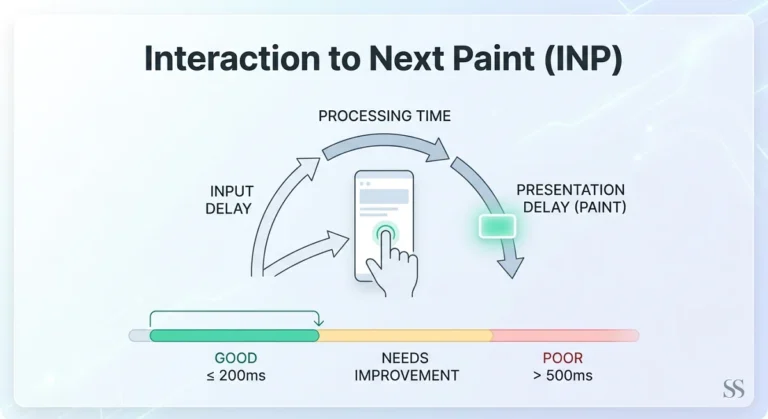
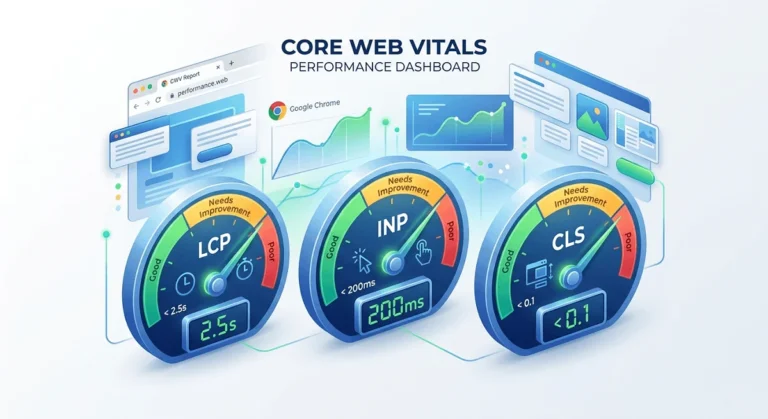
Google has codified speed expectations through Core Web Vitals (LCP, INP, and CLS), which directly feed into its page experience ranking signal. Sites failing these thresholds cede positions to faster competitors, compounding the traffic loss on top of the conversion rate drop. Only 38% of WordPress sites currently pass all three Core Web Vitals, a gap that starts at the hosting layer, not the plugin layer. As of June 2025, 67% of all websites have achieved a fast LCP score, meaning the competitive bar is rising.
Kinsta, WP Engine, and Rocket.net are built from the ground up around this reality. These managed WordPress hosts invest in Google Cloud C3D infrastructure, Cloudflare edge caching, and Redis object caching to serve pages before most shared hosting servers even wake up to handle the request.
What Actually Makes a WordPress Host Fast?
Before comparing providers, it helps to understand the five infrastructure levers that separate fast hosts from marketing claims:
- Time to First Byte (TTFB): The server’s response time to the first request. Under 200ms is excellent; above 600ms signals a server-level problem no caching plugin can fully fix.
- Server stack: LiteSpeed Web Server has matured into a genuine Nginx competitor in 2026, with built-in edge caching that eliminates the need for separate caching plugins. Kinsta runs Nginx on Google Cloud C3D.
- Caching architecture: Server-level full-page cache + edge cache + Redis object cache is the gold standard. Caching at only the plugin level cannot cover dynamic pages, WooCommerce checkouts, or membership sections, the “caching gap.”
- CDN and edge delivery: A CDN reduces TTFB by 60–80% for globally distributed audiences.
- Kinsta uses Cloudflare’s 260+ Points of Presence (PoPs);
- WP Engine added edge caching to its stack and has consistently outperformed competitors over the last 10 months.
- Compute infrastructure: Cloud-based isolated containers (like Kinsta’s) prevent noisy-neighbor slowdowns common on shared hosting. Shared hosts split resources across hundreds of sites, which directly limits TTFB under load.
Top 7 Fastest WordPress Hosting Providers: In-Depth Comparison
1. Kinsta: Fastest Managed WordPress Host Overall
Kinsta runs on Google Cloud’s compute-optimized C3D instances with a proprietary edge caching layer built on Cloudflare. In independent benchmarks from early 2026, Kinsta delivered:
- TTFB (cached): 70–85ms
- Full load time: 624ms
- First Contentful Paint: 237ms
- Largest Contentful Paint: 251ms
- Total Blocking Time: 0ms
- Load test avg response: 32ms
Every Kinsta plan includes advanced server-level caching, Redis object cache, PHP 8.3 with OPcache, isolated container infrastructure, and access to 37 global data centers. There is no separate CDN plugin to configure; it comes built in. Load testing shows Kinsta handling traffic spikes with an average response of 32ms and a max of 228ms, with no visible backend strain.
Best for: Premium WordPress sites, agencies, and SaaS businesses where speed is a business metric.
Pricing: Starter at $35/month (1 site, 25K visits); Business plans from $115/month.
2. WP Engine: Best for Enterprise WordPress
WP Engine has invested heavily in its infrastructure stack since 2024, adding edge caching that has consistently moved its benchmark scores upward over the last 10 months. In 2026 speed tests, WP Engine achieved under 200ms TTFB, placing it firmly in the top tier alongside Kinsta.
WP Engine is purpose-built for WordPress developers, offering Git integration, one-click staging, and Genesis framework access. Its Global Edge Security layer combines a CDN, firewall, and DDoS protection in a single stack. If your host doesn’t include a built-in firewall, a dedicated WordPress security plugin fills that gap.
Best for: Enterprise websites, large-scale eCommerce, and development teams needing staging and Git workflows.
Pricing: From $35/month (Basic, 1 site).
3. Rocket.net: Fastest All-Time in Long-Term Benchmarks
Based on 26,300+ individual tests run across 18+ providers from 2021 through April 2026, Rocket.net holds the title of fastest all-time WordPress host in long-term aggregate benchmarks. It was also the fastest provider in April 2026, specifically.
Rocket.net delivers approximately 90ms cached TTFB through its enterprise-grade Cloudflare infrastructure, enterprise WAF, and Imunify360 malware protection. What distinguishes Rocket.net is consistency: it does not spike in benchmarks but stays fast over sustained periods.
Best for: Site owners who prioritize long-term performance consistency, not just peak scores.
Pricing: From $30/month.
4. Hostinger: Best Budget WordPress Host for Speed
Hostinger is the most important story in WordPress hosting value in 2026. In a 30-day live monitoring study, Hostinger delivered a median 223ms global TTFB, the fastest result of any shared WordPress hosting platform tested. That is faster than some managed WordPress services costing $30–50/month.
Hostinger’s speed stack includes LiteSpeed Web Server + LiteSpeed Cache + NVMe SSD storage + Cloudflare CDN integration. Most shared hosts in the same study averaged 400–600ms TTFB. Hostinger delivers nearly double the performance at a fraction of managed pricing. Average uptime holds at 99.98%.
Best for: Bloggers, small businesses, and solo WordPress users who want real-world speed without a managed budget.
Pricing: From $2.99/month (introductory rate).
5. SiteGround: Best Mid-Range Balance of Speed and Features
SiteGround runs its custom SuperCacher technology on Google Cloud infrastructure, delivering consistent TTFB in the 250ms range. It offers three caching layers (static, memcache, dynamic) plus a free CDN, and all plans include daily backups, free SSL, and managed WordPress updates.
SiteGround is officially recommended by WordPress.org and performs reliably in global test environments. It is not the absolute fastest, but it represents the strongest mid-range balance of speed, features, support, and price in 2026.
Best for: Small-to-medium businesses wanting a managed-lite experience without full managed pricing.
Pricing: From $6.99/month (GrowBig plan recommended for WordPress).
6. Cloudways: Best for Developers Wanting Cloud Speed
Cloudways is a managed cloud platform that lets you deploy WordPress on DigitalOcean, Vultr, Linode, AWS, or Google Cloud, giving you the power to choose infrastructure without managing raw servers. With Vultr High-Frequency compute at $12/month paired with SpinupWP and Cloudflare Pro, you can build a stack delivering 90ms cached TTFB that outperforms Kinsta on raw speed at a similar price.
Cloudways includes Breeze caching, free SSL, staging environments, and team collaboration tools. It is the preferred platform for developers and agencies managing multiple client sites.
Best for: Developers, agencies, and technically confident users wanting cloud-grade performance with flexibility.
Pricing: From $14/month (DigitalOcean 1GB).
7. WPX Hosting: Fast CDN With a Managed Experience
WPX Hosting is a WordPress-focused managed provider with 37+ XDN points globally. Users experience an average response time of 463ms and a load time of 1.47 seconds, competitive for managed WordPress and outstanding compared to standard shared hosts. WPX runs LiteSpeed Server + LiteSpeed Cache + OPcache and offers free malware removal and daily backups.
Note: Independent testing has flagged variable first-visit TTFB (50ms to 2.1 seconds across 40 global locations), meaning CDN hits are fast, but cache misses can be slow. Test from your primary audience’s region before committing.
Best for: Users who want a managed WordPress experience with strong CDN coverage and hands-off maintenance.
Pricing: From $20/month.
Speed Feature Comparison: What Each Host Includes
| Feature | Kinsta | WP Engine | Hostinger | SiteGround | Cloudways | WPX |
|---|---|---|---|---|---|---|
| Server Stack | Nginx / GCP C3D | Nginx / AWS | LiteSpeed | Nginx / GCP | Nginx / Multi-cloud | LiteSpeed |
| Edge CDN | Cloudflare (260+ PoPs) | Global Edge Security | Cloudflare | Cloudflare CDN | BunnyCDN / Cloudflare | Custom XDN (37 PoPs) |
| Server-Level Cache | ✅ Full-page + Redis | ✅ EverCache + Edge | ✅ LiteSpeed Cache | ✅ SuperCacher (3 layers) | ✅ Breeze Cache | ✅ LiteSpeed Cache |
| PHP Version | PHP 8.3 + OPcache | PHP 8.3 | PHP 8.3 | PHP 8.3 | PHP 8.3 | PHP 8.3 |
| Object Cache (Redis) | ✅ All plans | ✅ All plans | ❌ Add-on | ❌ Add-on | ✅ Add-on | ✅ Built-in |
| Isolated Containers | ✅ | ✅ | ❌ | ❌ | ✅ (VPS) | ✅ |
| Free SSL | ✅ | ✅ | ✅ | ✅ | ✅ | ✅ |
| Staging Environment | ✅ | ✅ | ✅ (Business+) | ✅ | ✅ | ✅ |
| Uptime Guarantee | 99.9% | 99.95% | 99.9% | 99.9% | 99.99% | 99.95% |
Managed vs. Shared vs. Cloud VPS: Which Is Actually Fastest?
In every independent 2026 speed test, managed WordPress hosts outperformed shared hosts. Managed hosts allocate dedicated server resources per site and use WordPress-specific caching stacks. Shared hosts split resources across hundreds of sites, which directly limits TTFB under load.
However, the picture is more nuanced in 2026:
Managed WordPress (Kinsta, WP Engine, Rocket.net)
- Best raw performance and consistency
- Handles traffic spikes without degradation
- Highest price, but no server management required
- Cannot be “optimized around” with plugins alone
Optimized Shared Hosting (Hostinger, SiteGround)
- Hostinger’s LiteSpeed architecture closes much of the gap with managed hosts
- Sufficient for most blogs, portfolios, and SME websites
- Best cost efficiency per millisecond of speed
Cloud VPS (Cloudways, self-managed Vultr/Hetzner)
- Highest ceiling for performance and scalability
- Vultr High-Frequency + SpinupWP + Cloudflare Pro delivers ~90ms cached TTFB, comparable to Kinsta at $44/month total
- Requires technical confidence; not plug-and-play
How to Measure Your WordPress Hosting Speed
Do not rely on synthetic benchmarks alone. Use these tools to measure your actual hosting performance:
- GTmetrix — Free, measures TTFB, LCP, and full load time from multiple regions
- WebPageTest — Industry standard for multi-location testing; used by most independent benchmarks
- Google PageSpeed Insights — Combines lab data with real-world CrUX data from actual Chrome users
- Pingdom Tools — Simple load time monitoring with uptime alerts
- KeyCDN Performance Test — Tests TTFB from 14 global locations simultaneously
Benchmark targets for 2026:
- TTFB under 200ms → Excellent (managed WordPress standard)
- TTFB 200–400ms → Acceptable for shared hosting
- TTFB above 600ms → Server-level problem requiring a host change, not a plugin fix
- LCP under 2.5s → Google’s “Good” Core Web Vitals threshold
- Full load time under 2s → Recommended for eCommerce conversion rates
Frequently Asked Questions (FAQs)
Does WordPress hosting speed affect Google rankings?
Yes, directly and measurably. Google includes Core Web Vitals as a page experience ranking signal, and TTFB is the primary driver of Largest Contentful Paint (LCP), the single most weighted Core Web Vital for rankings. Sites that consistently fail Core Web Vitals thresholds cede organic positions to faster competitors, all else being equal. Beyond algorithmic signals, slower pages produce worse behavioral metrics (higher bounce rate, lower dwell time), which independently reinforce ranking disadvantages. Sites in the top Core Web Vitals tier average a 3.2-position ranking advantage over poor performers, according to 2026 correlation data.
Is managed WordPress hosting always faster than shared hosting?
In 2026 speed tests, yes, all managed hosts outperformed standard shared hosts. However, Hostinger’s LiteSpeed-powered shared infrastructure achieved a 223ms global TTFB in independent monitoring, which outperforms several managed hosts charging 10–15x more. The gap between good shared hosting and managed hosting has narrowed significantly, particularly for low-to-moderate traffic sites. For sites experiencing high traffic, WooCommerce stores, or membership platforms with dynamic pages, managed hosting’s isolated containers and server-level object caching deliver a performance floor that shared hosting cannot match.
Can caching plugins make a slow host fast?
Partially, but not completely. Caching plugins like WP Rocket, FlyingPress and LiteSpeed Cache can reduce load times by 30–50% through static page caching, image optimization, and script deferral. However, caching cannot help dynamic pages (WooCommerce cart and checkout, membership dashboards, personalized content), where your raw TTFB is fully exposed. If your host’s TTFB is above 400ms in a real speed test, no plugin will overcome that server-level bottleneck. The correct fix is a faster host; plugins can then amplify the gains.
What is a good TTFB for WordPress hosting in 2026?
Industry benchmarks for 2026: under 200ms TTFB is excellent and achievable with managed hosts like Kinsta (70ms) and WP Engine (<200ms). Under 400ms is acceptable and within Google’s Core Web Vitals standard. Anything above 600ms signals a server-level problem; this is the threshold where no amount of plugin optimization or image compression will rescue your Core Web Vitals scores. For reference, Hostinger delivers 223ms from shared infrastructure; most standard shared hosts average 400–600ms.
Which of the fastest WordPress hosts gives the best value for money?
Based on 2026 benchmark data, Hostinger delivers the best speed-per-dollar ratio; 223ms global TTFB at $2.99/month, beating most providers charging $20–50/month. For users who need managed WordPress with isolated containers, Redis object caching, and enterprise CDN, Kinsta’s Starter plan at $35/month represents the best performance per dollar among premium providers. For developers, Cloudways on Vultr High-Frequency (~$44/month total with SpinupWP and Cloudflare Pro) delivers Kinsta-comparable cached TTFB with more server control and no visit-based pricing.
The Bottom Line: Choosing the Fastest WordPress Hosting for Your Needs
Your fastest WordPress hosting decision depends on your traffic volume, technical comfort level, and budget:
- Under $5/month, need real speed: → Hostinger (223ms TTFB, LiteSpeed, NVMe storage)
- Mid-range managed experience: → SiteGround (Google Cloud, SuperCacher, WordPress.org recommended)
- Developer-grade cloud performance: → Cloudways (multi-cloud choice, scalable, BunnyCDN)
- Best premium managed WordPress: → Kinsta (70ms TTFB, Google Cloud C3D, Redis, 37 data centers)
- Enterprise WordPress with developer tools: → WP Engine (edge caching, Git, Global Edge Security)
- Consistent long-term performance: → Rocket.net (fastest all-time in 26,300+ test dataset)
Whatever provider you choose, remember: hosting speed is the one performance factor you cannot optimize your way around. You can compress every image, defer every script, and lazy-load everything below the fold, but if your server takes 500ms to respond, your LCP starts with a 500ms stuck before the browser receives a single byte of HTML. Start with the fastest WordPress hosting you can afford, and let plugins amplify what’s already there.

Article By
Shahab Ud Din
I am WordPress Speed and Core Web Vitals Expert. I have optimized 150+ WordPress sites over 5+ years, fixing slow load times, failing Core Web Vitals, and poor mobile scores. Best result: mobile LCP from 30.7s → 2.4s in 3 days. I work with business owners, bloggers, and WooCommerce stores who need fast, rank-ready websites, with a No Fix = No Fee guarantee.