
Cumulative Layout Shift (CLS) Fix Service — CLS Under 0.1 Guaranteed or You Don’t Pay
I stabilize your website by fixing layout shifts for
Better User Experience, SEO, and Conversions.
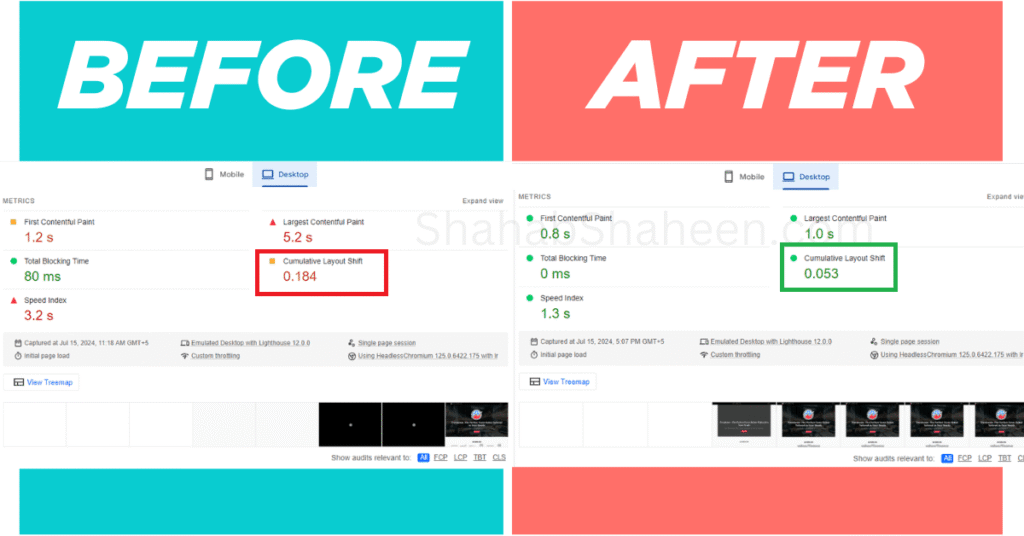
CLS improvement — before & after
Do you want 80-90% mobile conversion rates like Redbus? My Cumulative Layout Shift (CLS) optimization services are designed to ensure your website delivers a stable and seamless user experience, leading to higher engagement, better SEO rankings, and increased conversions.
What is Cumulative Layout Shift (CLS)?
Cumulative Layout Shift (CLS) is a critical Core Web Vitals metric that measures visual stability on your website. It quantifies unexpected layout shifts that occur as your page loads. A good CLS score is less than 0.1. Poor CLS scores frustrate users, reduce trust and conversions, and negatively impact SEO performance.
Why CLS Matters
- Enhanced User Experience: Prevents annoying layout shifts that drive users away, impacting conversions badly.
- Higher SEO Rankings: Google prioritizes websites with low CLS scores in search results and rewards them with a high ranking on SERP.
- Improved Conversions: A visually stable website builds trust and encourages users to take action to help increase conversions.
My CLS Optimization Services Process
My Cumulative Layout Shift (CLS) services tackle every factor contributing to visual instability:
- Comprehensive Site Audit: Using tools like PageSpeed Insights and Lighthouse, I identify the elements causing unexpected layout shifts.
- Image Dimension Fixes: Ensure all images, ads, and embeds have defined width and height attributes to maintain layout stability.
- Font Optimization: Use font-display settings to prevent Flash of Unstyled Text (FOUT) or Flash of Invisible Text (FOIT).
- Ad Placement Stability: Optimize ad placements and reserve adequate space to avoid sudden shifts.
- Lazy Loading Adjustments: Fine-tune lazy loading to prioritize above-the-fold content and prevent late-rendering issues.
- Content Placement Optimization: Fix layout shifts caused by dynamically injected content such as banners, pop-ups, or third-party widgets.
- CSS Optimization: Minify and preload essential CSS to ensure the website structure is visually stable during loading.
Why Choose Me?
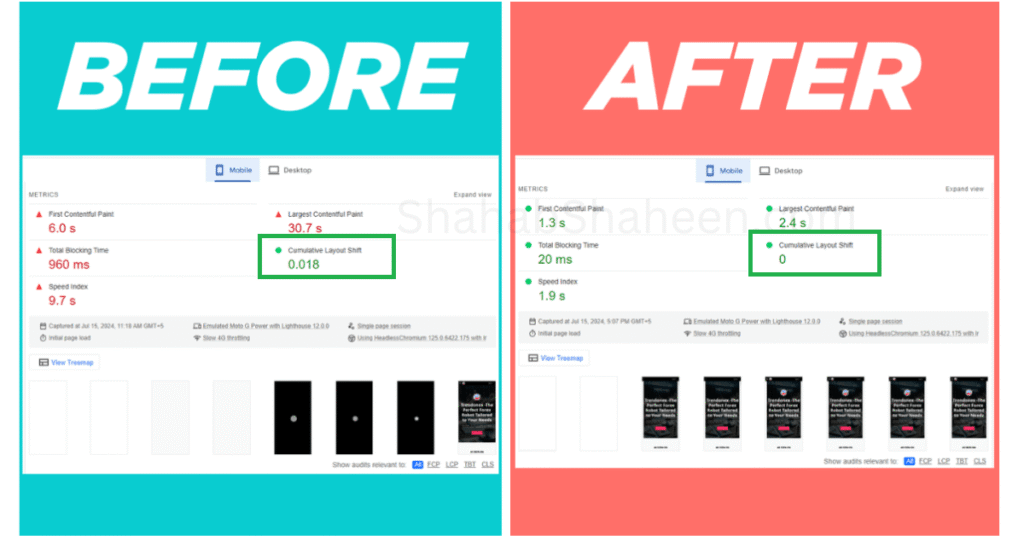
- ✅ CLS reduced from 0.42 → 0.01 for a WordPress site
- ✅ CLS reduced from 0.184 → 0.053 for desktop
- ✅ No Fix = No Fee, if CLS doesn’t hit under 0.1, you pay nothing
- ✅ Results visible in PageSpeed Insights the same day
- ✅ I fix CLS at the root cause, not just image dimensions
- ✅ Ad placements, dynamic content, pop-ups, and web fonts all covered
- ✅ CLS score under 0.1 guaranteed, desktop and mobile
Frequently Asked Questions (FAQs)
A good CLS score is under 0.1 according to Google’s Core Web Vitals standards. A score between 0.1 and 0.25 is rated “Needs Improvement,” and anything above 0.25 is rated “Poor.” The closer your CLS score is to 0, the better; a perfect score means zero unexpected layout shifts happen as your page loads.
The most common causes are images and videos without defined width and height dimensions, web fonts that load late and push content around (FOUT/FOIT), ads and banners that load after the page renders, dynamically injected content like pop-ups, cookie banners, and chat widgets, and third-party embeds like YouTube videos or social media feeds that don’t have reserved space. On WordPress specifically, poorly coded plugins and page builders are frequent contributors.
You can check your CLS score for free using Google PageSpeed Insights (pagespeed.web.dev); enter your URL and look for the CLS metric under both Mobile and Desktop tabs. Google Search Console also shows CLS data under the Core Web Vitals report, which reflects real-user data over time. For more detailed diagnostics, use Chrome DevTools or WebPageTest to identify exactly which elements are shifting and when.
Mobile and desktop often have different CLS scores because layouts respond differently to screen sizes. Elements that are fixed on desktops may reflow on mobile, fonts may load differently, and ad placements often behave differently on smaller screens. It’s common to have a passing desktop CLS but a failing mobile CLS; both need to be fixed independently since Google measures them separately.
Yes, directly. CLS is one of Google’s three official Core Web Vitals metrics and is factored into the Page Experience ranking signal. A poor CLS score signals to Google that your site delivers a frustrating user experience, which can push you down in search results, especially when competing against pages with similar content quality but better Core Web Vitals scores.
No. CLS fixes are made at the code and configuration level, defining image dimensions, adjusting font loading behavior, and reserving space for ads and embeds. Your actual design, colors, fonts, content, and layout all remain the same visually. The only difference is that elements stop jumping around as the page loads, which makes the experience smoother for visitors.
This is very common and happens because PageSpeed Insights measures a simulated lab test, while Google Search Console reports real-user field data collected over 28 days. Real users may experience shifts caused by slow connections, ad networks loading late, or dynamic content that doesn’t appear in lab tests. Both scores matter; field data is what Google actually uses for ranking decisions.
Most CLS issues are resolved within 1–2 business days. Simple cases involving image dimensions and font loading are often fixed within 24 hours. More complex cases involving multiple ad networks, third-party widgets, or dynamically injected content may take up to 3 days. Results are visible in Google PageSpeed Insights immediately after the fixes are applied, though Search Console field data takes up to 28 days to fully update.
Image dimensions are just one of many CLS causes. If your score is still poor after fixing images, the culprit is likely one of these: a web font causing text to reflow on load, an ad or banner network injecting content after the page renders, a cookie consent popup or chat widget pushing content down, or a WordPress plugin dynamically adding elements above the fold. A proper CLS audit traces every shift frame-by-frame to identify all causes, not just the obvious ones.
Let’s Stabilize Your Website Today!
Stop losing visitors due to frustrating layout shifts. With my Cumulative Layout Shift (CLS) optimization services, you can ensure your website is fast, stable, and optimized for increasing conversions and SEO ranking on the SERP.
Get your CLS under 0.1, guaranteed. Request your $25 audit — fully credited toward your fix — and I’ll diagnose the exact issue within 24 hours.
Need LCP fixed too?
My Complete Plan ($249) covers both CLS + LCP + Mobile in one package.