
Largest Contentful Paint (LCP) Fix Service — Under 2.5s Guaranteed or You Don’t Pay
Fix Your LCP in Under 2.5s – Boost SEO & Conversions.
150+ websites optimized.
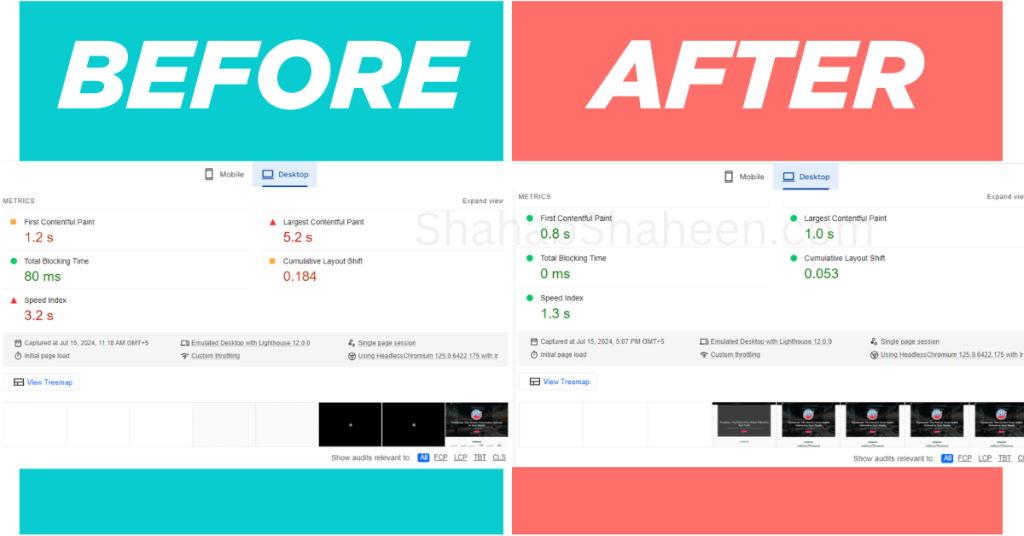
LCP improvement — before & after
Do you want to increase sales by 8% like Vodafone? I specialize in improving Largest Contentful Paint (LCP) to ensure your website loads faster, ranks higher, and delivers a seamless user experience to increase conversions. If your site loads slowly above the fold, Google ranks you lower; that’s why LCP is critical.
What is the Largest Contentful Paint (LCP)?
Largest Contentful Paint (LCP) is a critical Core Web Vitals metric that measures how quickly the largest visible content element (e.g., images, text, or video) on your page loads for users. Google considers it an essential factor for SEO and user satisfaction. A good LCP score is under 2.5 seconds. Fixing it is one piece of the puzzle; if you also have layout instability, see my CLS Fix Service.

Why LCP Matters
- Boost SEO Rankings: Google prioritizes websites with faster LCP, helping your website rank higher on the SERP.
- Improve User Experience: Faster load times lead to a better experience, reducing bounce rates.
- Increase Conversions: Fast and optimized pages directly impact customer satisfaction and drive more sales.
My LCP Optimization Services Process
My Largest Contentful Paint (LCP) optimization services focus on tackling every element impacting it. Here’s exactly what I do to fix it; no guesswork, no generic solutions:
- Performance Analysis: I use tools like PageSpeed Insights, Lighthouse, and WebPageTest to identify the root causes of poor LCP performance.
- Image Optimization: Compress and serve images in modern formats (like WebP or AVIF), optimize sizes, and implement responsive loading techniques.
- Render-Blocking Resource Elimination: Remove or defer CSS and JavaScript files that delay the rendering of visible content.
- Server Response Time Optimization: Reduce TTFB (Time to First Byte) by optimizing hosting, using CDNs, and implementing caching mechanisms.
- Critical Resource Preloading: Preload fonts, images, and key assets to ensure essential content loads immediately.
- Lazy Loading and Priority Loading: Implement lazy loading for non-critical assets and prioritize above-the-fold content for faster rendering.
- Optimize Web Fonts: Deliver fonts using font-display properties to prevent layout shifts and improve LCP scores.
Why Choose My Services?
- ✅ Reduced LCP from 30.7s → 2.4s for a WooCommerce client (3 days)
- ✅ Desktop LCP from 5.2s → 1.0s without touching the design
- ✅ No Fix = No Fee — if LCP doesn’t hit the target, you pay nothing
- ✅ Results visible in PageSpeed Insights the same day
Frequently Asked Questions (FAQs)
A good LCP score is under 2.5 seconds according to Google’s Core Web Vitals thresholds. Between 2.5–4.0 seconds is considered “Needs Improvement,” and anything above 4.0 seconds is rated “Poor.” For competitive industries like e-commerce, aiming for under 1.5 seconds gives you a significant edge over slower competitors.
The most common causes are slow server response times (high TTFB), large unoptimized images, render-blocking JavaScript and CSS, no preloading of critical resources, and slow third-party scripts like chat widgets, ad scripts, or analytics tools. On WordPress specifically, bloated themes and poorly coded plugins are frequent culprits.
You can check your LCP score for free using Google PageSpeed Insights (pagespeed.web.dev), Google Search Console under the Core Web Vitals report, or tools like GTmetrix and WebPageTest. Enter your URL and look for the LCP metric under both Mobile and Desktop results; both scores matter for SEO.
For most WordPress websites, LCP can be fixed within 1–3 business days. Simple sites with image and caching issues are often resolved in 24 hours. More complex sites with server-side issues, third-party scripts, or WooCommerce setups may take up to 3 days. You’ll see the improvement in PageSpeed Insights immediately after the fixes are applied.
Some LCP issues, like installing a caching plugin or compressing images, can be done yourself. However, the deeper causes like eliminating render-blocking resources, reducing TTFB, preloading critical assets, and fixing third-party script delays, require technical expertise. DIY fixes often improve the score partially, but rarely get you to a consistent 90+ across both mobile and desktop.
Mobile LCP is almost always lower than desktop because mobile devices have slower processors, limited memory, and rely on cellular connections. On top of that, many WordPress themes and builders load the same heavy resources on mobile as desktop without any mobile-specific optimization. Fixing mobile LCP requires a dedicated approach, not just copying desktop fixes.
Yes, directly. LCP is one of Google’s three Core Web Vitals and is used as a ranking signal in the Page Experience update. A poor LCP score puts you at a disadvantage against competitors with faster sites, especially when content quality is similar. Improving LCP won’t guarantee a ranking jump overnight, but it removes a penalty that may be actively holding your site back.
No. LCP optimization works entirely at the performance layer, which involves how assets are loaded, compressed, and delivered to the browser. Your visual design, page layout, text, images, and functionality all stay exactly as they are. I test before and after every change to confirm nothing is visually affected.
Page load time measures how long it takes for the entire page to fully load. LCP measures something more specific: how quickly the largest visible element above the fold (usually your hero image or main heading) appears to the user. Google focuses on LCP because it reflects the user’s perceived speed, how fast the page feels, which is more closely tied to bounce rate and conversions than total load time.
Ready to Fix Your Website LCP?
Don’t let a poor Largest Contentful Paint (LCP) score drag down your website’s performance, SEO ranking, and conversions.
Get your LCP under 2.5 seconds; guaranteed. Request your $25 audit(fully credited toward your fix), and I will diagnose the exact issue within 24 hours.
Need full speed optimization too?
See My Complete Plan ($249), which includes LCP, CLS, and Mobile.