How to Fix Duplicate without user-selected Canonical Error in GSC
The Duplicate without user-selected canonical status in Google Search Console (GSC) means Google has detected duplicate or very similar content across multiple URLs on your site, but you haven’t specified a preferred (canonical) version using a rel=”canonical” tag. As a result, Google automatically selects one URL as the canonical version and excludes the duplicates from indexing. This prevents keyword cannibalization and consolidates ranking signals, but it can lead to unintended pages being prioritized if you don’t guide Google.
This issue is common on large sites like e-commerce platforms, blogs with pagination, or sites with URL parameters (e.g., ?sort=price or ?page=2). Fixing it involves identifying duplicates, adding self-referencing or cross-page canonical tags, or using redirects. Tools like Yoast SEO, Rank Math, or AIOSEO make implementation easy on platforms like WordPress.
What Causes Duplicate Without User-Selected Canonical?
Duplicate content arises from technical or structural issues, not always malicious copying. Common causes include:
- URL variations — HTTP vs. HTTPS, www vs. non-www, trailing slashes, or parameters.
- Pagination and filters — Pages like /blog/page/2 or product listings with ?color=red.
- Mobile/print versions — Separate URLs for device-optimized content.
- CMS quirks — Duplicate sitemaps, session IDs, or auto-generated pages (e.g., PDFs mirroring product pages).
- Multilingual setups — Similar content across domains without proper hreflang/canonical signals.
Without a user-selected canonical tag, Google chooses based on signals like internal links, sitemaps, and content similarity. This can result in the wrong page being indexed.
Comparison of Canonical Solutions
| Solution | Best For | Pros | Cons | Tools/Implementation |
|---|---|---|---|---|
| Self-Referencing Canonical | Most pages (e.g., unique content) | Simple, consolidates signals without redirects | Doesn’t handle true duplicates | Add <link rel=”canonical” href=”self-URL”> |
| Cross-Page Canonical | Similar pages (e.g., filters, pagination) | Guides Google to preferred URL | Risk of over-canonicalization | Point non-preferred to preferred URL |
| 301 Redirect | Permanent duplicates | Strong signal, transfers authority | Removes access to original URL | Server-side (.htaccess, CMS plugins) |
| Noindex | Low-value pages (e.g., tags) | Prevents indexing entirely | No signal consolidation | Meta robots tag or X-Robots-Tag header |
| HTTP Header Canonical | Non-HTML (e.g., PDFs) | Works for files without HTML head | Requires server config | .htaccess or server headers |
The best choice depends on user intent; use redirects for obsolete URLs and canonicals for live variants.
Impact of Duplicate Content on SEO
Duplicate content doesn’t trigger a direct penalty (Google confirms no “duplicate content penalty”), but it dilutes authority by splitting signals like backlinks and rankings. Studies show:
- 29% of websites face duplicate content issues regularly.
- Sites with unmanaged duplicates can see up to 35% traffic loss from split rankings.
- E-commerce sites with variant pages (e.g., color options) often lose 45% visibility without canonicals.
In one case study, an e-commerce brand fixed canonicals on filter pages, resulting in a 45% increase in organic traffic for top products. Another saw 35% traffic uplift after canonicalizing paginated content.
How to Fix “Duplicate Without User-Selected Canonical”
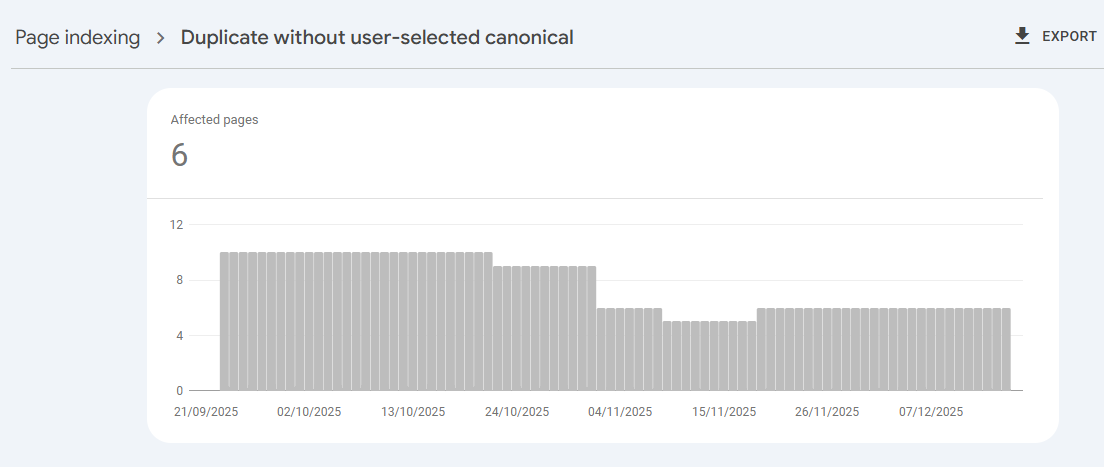
- Identify Affected Pages — In GSC > Pages > Why pages aren’t indexed > “Duplicate without user-selected canonical.”
- Inspect URLs — Use GSC URL Inspection to see Google’s chosen canonical.
- Implement Canonicals — Add tags to preferred pages (self-referencing), or point duplicates to the main one.
- Validate Fix — Submit changes in GSC and monitor recrawl.
- Use Tools — Plugins like Yoast SEO, Rank Math, or crawlers like Screaming Frog help automate.
Frequently Asked Questions (FAQs)
The first means no canonical tag exists, so Google picks one. The second means you set a canonical, but Google ignored it due to conflicting signals (e.g., internal links or redirects).
Yes, but it’s risky—Google’s pick might not align with your priorities. Adding a canonical ensures control.
Canonicals are softer hints (Google may ignore them) and keep URLs accessible. 301s are stronger for permanent changes, but remove the duplicate URL.
Yes, duplicate content confuses AI systems like Google AI Overviews, splitting visibility. Canonicals help consolidate authority.
Google Search Console (free), Ahrefs/Semrush (paid audits), and WordPress plugins like Yoast or Rank Math simplify fixes.