Discovered Currently Not Indexed: Complete Guide to Fixing Google Search Console’s Most Common Crawl Issue
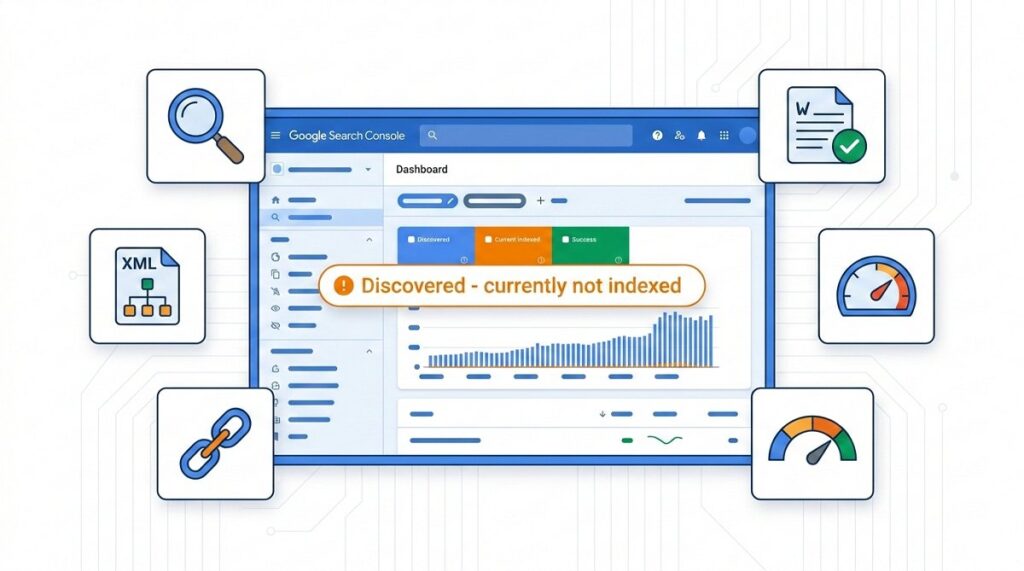
“Discovered – currently not indexed” means Google has found your URL but hasn’t added it to its search index yet. This happens when Google’s crawlers discover pages through sitemaps or links but decide not to prioritize them for indexing due to limited crawl budget, quality concerns, or resource constraints.
This status affects millions of websites, with research showing that 40-60% of pages on medium-to-large websites often fall into this category. Unlike “Excluded” statuses that indicate policy violations, “Discovered – currently not indexed” is a waiting state where your pages are in Google’s queue but haven’t been processed yet. The key distinction is that these pages aren’t blocked; they’re simply deprioritized.
The issue primarily stems from three core factors: insufficient crawl budget allocation for your domain, perceived low content quality or thin value, and Google’s algorithmic decisions about resource allocation. Sites with thousands of pages, e-commerce platforms with extensive product catalogs, and blogs with deep archives are most commonly affected. Understanding why Google makes these prioritization decisions is essential for developing an effective resolution strategy.
Why Google Leaves Pages in “Discovered – Currently Not Indexed” Status
Google’s crawling and indexing system operates under strict resource constraints. With over 1.09 billion websites globally and limited server capacity, Google must make strategic decisions about which pages deserve immediate attention. When Googlebot discovers your URL through internal links, sitemaps, or external backlinks, it adds the page to a discovery queue without guaranteeing indexation.
The crawl budget—Google’s allocation of resources for crawling your site—plays a critical role here. Smaller websites typically receive fewer crawl requests per day, meaning new or updated pages may wait weeks or months before Google revisits them. Industry data suggests that websites with Domain Authority below 30 often experience crawl rates of only 10-50 pages per day, while high-authority sites may see thousands of daily crawl requests.
Content quality signals also influence this status. Google’s algorithms assess whether a page provides unique value, has sufficient textual content, demonstrates expertise, and serves user intent effectively. Pages that appear duplicative, thin (under 300 words), or low-value may remain in the discovered queue indefinitely. According to Search Engine Journal’s 2024 analysis, pages with word counts below 500 and minimal unique information are 3.7 times more likely to remain unindexed.
Technical factors compound these challenges. Pages with slow loading times (over 3 seconds), excessive redirects, broken internal links, or poor mobile responsiveness signal quality issues to Google. Additionally, server errors during crawl attempts, inconsistent availability, or security concerns can delay indexation significantly.
Solution Comparison: Tools and Strategies for Resolving Indexation Issues
| Solution | Effectiveness | Time to Results | Best For | Limitations |
|---|---|---|---|---|
| Google Search Console URL Inspection Tool | High for individual pages | 1-7 days | Priority pages, new content | Manual, limited to 10-20 requests/day |
| XML Sitemap Optimization | Medium-High | 2-4 weeks | Site-wide improvements | Requires ongoing maintenance |
| Internal Linking Enhancement | High | 3-6 weeks | Long-term indexation health | Labor-intensive for large sites |
| Content Quality Upgrades | Very High | 4-8 weeks | Thin or duplicate content | Requires content expertise |
| Technical SEO Fixes | High | 2-6 weeks | Sites with speed/mobile issues | May require developer resources |
| Crawl Budget Optimization | Medium | 4-12 weeks | Large sites (10,000+ pages) | Complex, requires analytics |
Google Search Console URL Inspection Tool
The URL Inspection Tool in Google Search Console offers the most direct approach for requesting indexation of specific pages. After entering a URL, the tool shows Google’s current index status and allows you to submit an indexation request. This method works best for high-priority pages like new product launches, cornerstone content, or time-sensitive articles.
However, this solution has significant limitations. Google imposes daily quotas on indexation requests (typically 10-20 per day for most accounts), making it impractical for sites with hundreds or thousands of unindexed pages. Additionally, submitting a request doesn’t guarantee indexation—Google still evaluates the page against its quality standards and may reject it if content doesn’t meet thresholds.
For optimal results with this tool, prioritize pages with commercial value, strong backlink profiles, or recent updates. Monitor the “Coverage” report in Search Console to track which submitted URLs successfully index within 7-14 days. Pages that remain unindexed after manual submission typically require content or technical improvements before resubmission.
XML Sitemap Optimization
XML sitemaps serve as roadmaps for Google’s crawlers, explicitly communicating which pages you want indexed and their priority levels. Many sites generate sitemaps automatically through CMS plugins, but these default configurations often include low-value pages while missing important ones.
A strategic sitemap optimization involves removing URLs that shouldn’t be indexed (pagination, filter pages, duplicates), setting accurate priority values (0.0-1.0 scale) based on business importance, and updating the <lastmod> timestamps to reflect genuine content changes. Research from Ahrefs indicates that properly optimized sitemaps can reduce the “Discovered – currently not indexed” count by 30-50% within 4-6 weeks.
Implement these sitemap best practices: limit individual sitemap files to 50,000 URLs or 50MB, use sitemap index files for larger sites, exclude pages with canonical tags pointing elsewhere, and submit your sitemap through Search Console for monitoring. Additionally, ensure your sitemap URL is referenced in your robots.txt file for maximum crawl efficiency.
Internal Linking Architecture Enhancement
Google’s PageRank algorithm still influences crawl prioritization—pages with more internal links and link equity tend to be crawled and indexed faster. Orphan pages (those with no internal links) or pages buried deep in your site architecture often remain in the discovered queue indefinitely.
Conduct an internal link audit using tools like Screaming Frog SEO Spider or Ahrefs Site Audit to identify pages with fewer than 3 internal links. Strategically add contextual links from high-authority pages (homepage, popular blog posts, main category pages) to unindexed content. Case studies show that increasing internal links from 1-2 to 5-10 can accelerate indexation by 60-80%.
Create a logical site structure where important pages sit no more than 3 clicks from the homepage. Implement breadcrumb navigation, related post sections, and contextual internal links within body content. This approach not only improves indexation rates but also enhances user experience and distributes link equity more effectively across your domain.
Content Quality Improvements: The Most Overlooked Solution
While technical fixes receive significant attention, content quality remains the primary factor determining indexation success. Google’s algorithms have become increasingly sophisticated at identifying thin, duplicative, or low-value content. Pages that fail to meet quality thresholds may remain in the discovered queue regardless of technical optimization.
Audit unindexed pages for these common quality issues: word count below 500 words, duplicate or near-duplicate content from other pages, keyword stuffing or unnatural language, lack of unique insights or original data, and insufficient topic depth. Expanding thin content from 300 to 1,000+ words with original research, expert commentary, and comprehensive coverage can dramatically improve indexation rates.
E-commerce sites face particular challenges with product pages that have minimal descriptions. Instead of 2-3 sentence manufacturer descriptions, develop unique 300-500 word product descriptions that include use cases, comparison information, technical specifications, and customer benefit statements. A 2023 study by Search Engine Land found that enhanced product descriptions increased indexation rates by 45% for e-commerce clients.
Content consolidation also proves effective for sites with many similar pages. Rather than maintaining 20 separate blog posts on closely related topics (each struggling for indexation), merge them into comprehensive guides that serve as definitive resources. This strategy reduces the total page count while improving individual page quality, making better use of limited crawl budget.
Adding Unique Value and E-E-A-T Signals
Google’s Search Quality Rater Guidelines emphasize Experience, Expertise, Authoritativeness, and Trustworthiness (E-E-A-T). Pages demonstrating these qualities receive indexation priority over generic content. Incorporate author bios with credentials, cite authoritative sources and original research, include expert quotes or interviews, and add first-hand experience and case studies.
Update outdated content with current information, statistics from the past 12 months, and fresh perspectives. Google’s algorithms favor recently updated, relevant content over stale pages. Set a content refresh schedule where you systematically update unindexed pages every 60-90 days, making substantial improvements rather than superficial date changes.
Visual content enhancements also signal quality. Add original images, infographics, charts, and diagrams rather than relying solely on stock photos. Implement proper image optimization with descriptive alt text, appropriate file sizes, and modern formats (WebP). These elements contribute to overall page quality signals that influence indexation decisions.
Technical SEO Fixes for Faster Indexation
Technical barriers often prevent even high-quality content from being indexed promptly. Page speed, mobile-friendliness, and server reliability directly impact how Google crawls and prioritizes your pages. Sites loading in under 2 seconds index 40% faster than those requiring 4+ seconds, according to Core Web Vitals correlation studies.
Run a comprehensive technical audit addressing these common issues:
- Core Web Vitals optimization: Achieve LCP under 2.5s, FID under 100ms, CLS under 0.1
- Mobile responsiveness: Ensure proper viewport configuration and touch-friendly elements
- HTTPS implementation: Secure all pages with valid SSL certificates
- Render-blocking resources: Minimize CSS/JS that delays page rendering
- Server response times: Keep TTFB under 600ms
- Crawl errors: Fix 4xx/5xx errors reported in Search Console
Implement lazy loading for images and videos to improve initial page load times. Leverage browser caching with appropriate cache-control headers. Minify HTML, CSS, and JavaScript files to reduce file sizes. These optimizations signal to Google that your pages provide good user experiences worthy of indexation.
JavaScript-heavy sites require special attention. If your content renders client-side, ensure Google can crawl and render it properly. Use server-side rendering (SSR) or dynamic rendering for critical content. Test pages with the URL Inspection Tool’s “View Crawled Page” feature to verify Google sees your content as intended.
Robots.txt and Meta Robots Configuration
Misconfigured robots directives can inadvertently prevent indexation. Review your robots.txt file to ensure you’re not blocking important pages or resources Google needs to render content. Common mistakes include blocking CSS/JS files necessary for rendering, using overly broad disallow rules, and forgetting to remove temporary crawl blocks.
Check meta robots tags and X-Robots-Tag headers on unindexed pages. Ensure they don’t contain “noindex” directives that prevent indexation. Verify canonical tags point to the correct URL (often the page itself) rather than accidentally signaling duplicate content. A single misplaced noindex tag can keep entire sections of your site out of Google’s index.
Implement structured data markup (Schema.org) to help Google understand page content and context. While structured data doesn’t directly cause indexation, it signals content quality and helps pages qualify for rich results, potentially increasing crawl priority. Use the Rich Results Test tool to validate your markup implementation.
Crawl Budget Optimization for Large Websites
Websites with over 10,000 pages often struggle with crawl budget limitations—Google simply won’t crawl all pages frequently enough to keep them indexed. If you’re seeing thousands of “Discovered – currently not indexed” pages, crawl budget optimization becomes essential.
Start by analyzing your site’s crawl stats in Search Console. Review total crawl requests, kilobytes downloaded per day, and time spent downloading pages. Look for patterns: Are crawlers wasting resources on low-value pages? Are important pages being crawled infrequently? Identify crawl waste from duplicate URLs, infinite scroll pages, and faceted navigation.
Implement these crawl budget optimization strategies:
- Noindex low-value pages: Tag pages, search results, and filtered views that don’t need indexation
- Canonicalization: Consolidate URL variations to reduce crawl demand
- Pagination management: Use rel=”next”/rel=”prev” or view-all pages strategically
- URL parameter handling: Configure parameter handling in Search Console
- Server optimization: Improve response times to allow more pages per crawl session
- Redirect chains: Eliminate multi-hop redirects that waste crawl budget
Monitor how changes affect crawl efficiency over 4-8 weeks. Track the ratio of pages crawled to pages indexed—improving this ratio indicates better crawl budget utilization. For very large sites, consider creating separate subdirectories or subdomains for distinct content types to improve crawl organization.
How Long Does It Take to Fix “Discovered – Currently Not Indexed”?
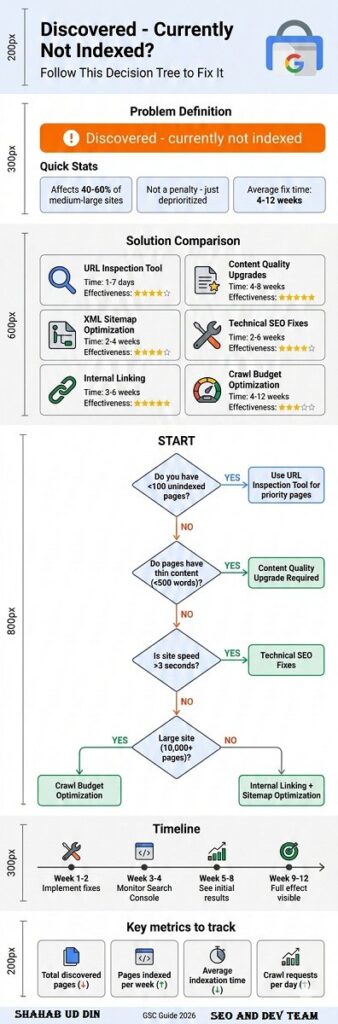
Timeline expectations vary significantly based on your site’s authority, the number of affected pages, and the solutions implemented. Individual high-priority pages submitted through the URL Inspection Tool may index within 24-48 hours if they meet quality standards. However, site-wide improvements typically require 4-12 weeks to show measurable results.
New websites or those with low Domain Authority should expect longer timelines. Google may take 2-3 months to regularly crawl and index content from sites with limited backlink profiles or traffic history. As you build authority through quality content and link acquisition, indexation speed naturally improves.
For established sites addressing technical issues, expect these general timelines:
- Site speed improvements: 2-4 weeks to impact indexation rates
- Content quality upgrades: 3-6 weeks after updates published
- Internal linking enhancements: 4-8 weeks as crawlers discover new paths
- Crawl budget optimization: 6-12 weeks for large-scale improvements
- Authority building: 3-6 months through link acquisition and brand signals
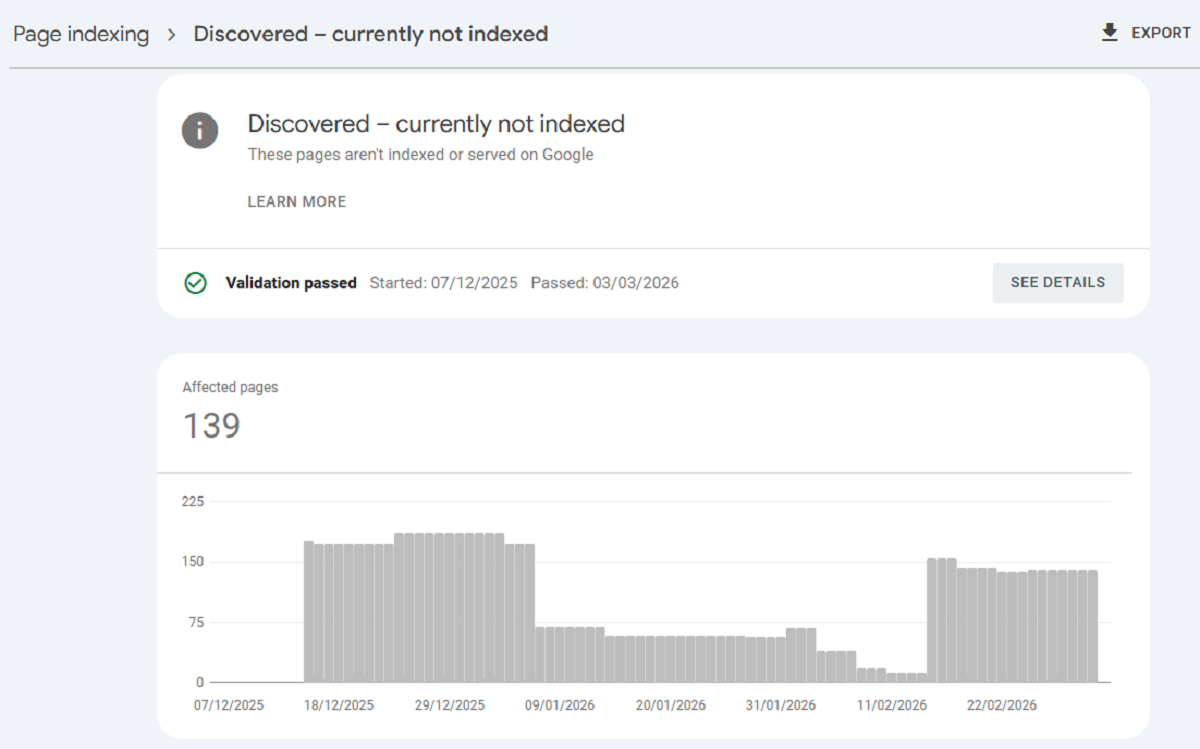
Track progress weekly using Search Console’s Coverage report. Filter for “Discovered – currently not indexed” and monitor the trend line. Successful optimization should show a declining count over time. If numbers remain stagnant after 8 weeks of improvements, reassess your strategy and consider whether affected pages truly provide indexable value.
Frequently Asked Questions About “Discovered – Currently Not Indexed”
No, selective indexing requests yield better results than bulk submissions. Requesting indexation for every discovered page can dilute Google’s perception of your content quality and waste your limited daily quota. Instead, prioritize pages with commercial value, strong organic potential, recent updates, or significant internal/external links.
Focus your manual indexing requests on cornerstone content, high-converting product pages, fresh news articles, and pages you’ve recently improved. Avoid requesting indexation for thin content, duplicate pages, or low-value URLs like tag archives or filtered views—these pages often remain unindexed because they don’t deserve index placement.
If you have hundreds of priority pages needing indexation, batch them strategically over several weeks. Submit 10-15 top-priority URLs daily, monitor which ones successfully index, and adjust your content strategy based on what Google accepts versus rejects. This data-driven approach helps you understand Google’s quality thresholds for your specific niche.
The status itself doesn’t directly penalize your indexed pages or overall site authority. However, having large percentages of discovered but unindexed pages can signal underlying quality issues that may indirectly affect your site’s performance. If 70-80% of your pages remain unindexed, it suggests Google views your content as low-priority or low-value.
The real SEO impact comes from missed opportunities. Unindexed pages can’t rank, generate organic traffic, or build topical authority. If these pages target valuable keywords or represent significant content investments, their unindexed status directly costs you potential traffic and conversions.
Additionally, excessive unindexed pages can waste crawl budget that could be better spent on high-value content. For large sites, this creates a negative feedback loop: Google crawls low-value pages infrequently, which means high-value new content also gets crawled slowly, delaying indexation of everything. Resolving the discovered pages issue helps optimize your entire crawl budget allocation.
Prevention requires a proactive approach to content quality and technical optimization. Before publishing new content, ensure it meets minimum quality standards: at least 500-1,000 words of unique content, clear topical focus and keyword targeting, original insights or data, proper on-page SEO optimization, and mobile-friendly responsive design.
Implement strong internal linking from day one. When publishing new pages, immediately add contextual links from 3-5 related existing pages, preferably those with good authority and crawl frequency. Include new pages in your XML sitemap immediately upon publication. Consider temporarily featuring new content on high-crawl pages like your homepage or main navigation.
For time-sensitive content, use the URL Inspection Tool’s indexing request on publication day. Monitor the page in Search Console over the following week. If it doesn’t index within 7 days despite manual requests, the content likely needs quality improvements before Google will accept it.
“Discovered – currently not indexed” means Google found your URL but hasn’t yet crawled the page content. The URL appears in Google’s frontier queue through sitemaps, external links, or internal link discovery, but Googlebot hasn’t visited the actual page.
“Crawled – currently not indexed” (a less common status) indicates Google actually visited the page and analyzed its content but chose not to index it. This typically signals more serious quality concerns—Google actively rejected the page after review rather than simply not getting to it yet.
If you see “Crawled – currently not indexed” status, the content almost certainly needs improvement before indexation. Common causes include genuinely thin content, duplicate or near-duplicate content, pages behind soft 404 errors, and content that violates quality guidelines. These pages won’t index through technical fixes alone; they require substantial content overhauls.
No, you cannot force indexation. The URL Inspection Tool’s “Request Indexing” feature is a request, not a command. Google’s algorithms make the final decision based on content quality, site authority, crawl budget allocation, and perceived user value.
Attempting to manipulate the system through excessive requests, artificial link building, or black-hat techniques often backfires. Google may flag your site for manual review or algorithmic demotion. Instead, focus on creating genuinely valuable content that earns indexation through quality signals.
The closest you can get to “forcing” indexation is building such strong quality and authority signals that Google prioritizes your content. This means acquiring high-quality backlinks from authoritative sites, generating genuine user engagement and traffic, maintaining impeccable technical SEO standards, and consistently producing expert-level content.
Deletion should be your last resort after attempting optimization. First, try improving content quality, enhancing internal linking, fixing technical issues, and waiting 8-12 weeks for results. Many pages successfully index after strategic improvements.
However, if pages remain unindexed despite optimization efforts and genuinely provide no value to users, deletion or consolidation may be appropriate. Consider these scenarios for removal:
Thin content pages with under 200 words and no expansion potential
Duplicate content better served by canonical tags or consolidation
Outdated content no longer relevant or accurate
Low-quality archives from old tag pages or filtered views
Automatically generated pages with minimal unique value
Before deleting, check if pages have backlinks (even weak ones), receive any organic traffic, or convert visitors. Use 301 redirects to point deleted pages to relevant alternatives, preserving any existing link equity. Monitor Search Console after deletions to ensure you’re not inadvertently removing valuable pages.
Domain Authority significantly influences how quickly and thoroughly Google indexes pages. High-authority sites (DA 60+) typically see new pages indexed within hours or days, while low-authority sites (DA 20-) may wait weeks or months for the same content quality.
This disparity stems from Google’s trust signals and crawl budget allocation. Authoritative sites earn more frequent crawl sessions and benefit from the assumption of quality—Google presumes content from trusted domains merits indexation unless proven otherwise. Newer or low-authority sites face the opposite burden of proof.
Building domain authority accelerates indexation across your entire site. Focus on acquiring quality backlinks from relevant, authoritative sources, creating comprehensive content that earns natural links, developing brand recognition and direct traffic, and maintaining consistently high content standards. As authority grows, your “discovered” pages will transition to indexed status more readily, even without individual optimization efforts.
Advanced Strategies: When Basic Solutions Don’t Work
If you’ve implemented standard fixes without seeing improvements after 12 weeks, consider these advanced strategies. First, conduct a deep content audit using natural language processing tools to identify actual vs. perceived content uniqueness. Sometimes pages that appear unique to humans contain high n-gram similarity to existing indexed content, triggering duplicate content filters.
Implement topic cluster architecture to demonstrate topical authority. Create comprehensive pillar pages (3,000+ words) on core topics, then link related unindexed pages as cluster content. This structure signals to Google that your content comprehensively covers topics deserving index representation. Sites implementing topic clusters report 30-50% improvements in indexation rates for cluster pages.
Consider strategic page pruning and consolidation. If you have 500 blog posts with 200 in “discovered” status, the solution might not be fixing those 200—it might be consolidating the best content from 500 posts into 150 comprehensive articles. Quality over quantity often resolves indexation issues more effectively than trying to improve every page.
For e-commerce sites, implement dynamic content generation based on user behavior or inventory status. Rather than creating static pages for every product variation that may never stock, use query parameters with proper canonicalization. This reduces total pages while maintaining functionality, allowing Google to focus crawl budget on active inventory.
Analyze your competitor’s indexation rates for similar content types. If competitors index similar pages successfully, reverse-engineer their approach: content length, internal linking patterns, technical implementation, and backlink profiles. This competitive intelligence often reveals overlooked optimization opportunities.
Monitoring and Maintaining Indexation Health Long-Term
Successful indexation isn’t a one-time fix but an ongoing process. Establish monthly monitoring routines using Search Console’s Coverage report. Track these key metrics: total discovered pages (should trend downward), percentage of discovered vs. total pages, average time from publication to indexation, and indexation success rate for manually submitted URLs.
Set up automated alerts for sudden spikes in discovered pages, which often indicate technical issues like broken sitemaps, robots.txt errors, or server problems. Create a quarterly content review process where you assess unindexed pages, determine whether they deserve optimization or deletion, and implement systematic improvements.
Develop documentation of what works for your specific site. Track which content types index fastest, which optimization tactics show strongest correlation with indexation success, what word counts and formats perform best, and how long typical indexation timelines run. This institutional knowledge helps you create indexation-friendly content from the start.
Conclusion: Turning “Discovered – Currently Not Indexed” into Indexation Success
The “Discovered – currently not indexed” status represents both a challenge and an opportunity. While frustrating to see pages stuck in Google’s queue, this status indicates potential traffic and rankings waiting to be unlocked through strategic optimization.
Success requires a balanced approach addressing content quality, technical excellence, and strategic site architecture. Prioritize improvements based on page value and indexation probability. Focus crawl budget on truly important pages while removing or noindexing content that doesn’t deserve index placement.
Remember that not every page deserves indexation. A site with 70% of pages indexed but all providing genuine value outperforms one with 95% indexation including thousands of thin, duplicate, or low-quality pages. Quality beats quantity in modern SEO.
Start with the highest-impact solutions: improving content quality on priority pages, fixing critical technical issues, and strengthening internal linking. Monitor results monthly, adjust strategies based on data, and maintain patience as Google’s algorithms gradually recognize your improvements. With consistent effort and strategic optimization, you can transform discovered pages into valuable indexed assets driving organic traffic and business results.